Your operating layer
in Slack.
Not just insights. Not just briefs. A command center that lets you see what's happening across your entire operation and act on it — without leaving Slack.
Two minutes. The actual system running.
This is WerxOS running our own operation inside Slack. Not a demo environment. Not a walkthrough of slides. The real system, live.
- Morning brief shows hot prospects and today's priorities
- Draft and send emails in one click from the brief
- Automated batch sends across tracks and sequence steps
- HubSpot deals created directly from reply alerts
- Reply rate, sequence stats, and checklist — all in Slack
Live walkthrough of the WerxOS sales module running inside Slack.
Something funny happens when people see how we run Werx Studio.
They stop asking about our services and start asking "wait, can you build that for us?"
We built our entire operation inside Slack. Not a new tool. Not another dashboard to log into. Just Slack — the thing your team already has open all day.
Tools don't know where to start.
There are tools that promise exactly this. Some are impressive. But a tool doesn't know which problem is actually worth solving.
The hard part was never the integrations.
It was knowing that the painful process and the broken process are rarely the same thing.
We know because we built it for ourselves.
The teams that keep asking us to build it for them are next.
The domains vary. The approach is always the same.
These are examples of what an operating layer looks like across different parts of a business — not a menu of options. What we build for you starts with a conversation about where your operation actually breaks down.
These are examples — not a fixed product. Every operating layer we build starts with your specific workflows, your stack, and the problem that's actually worth solving first.
See it.
Then act on it.
For Werx Studio this means hot prospects surfaced every morning, email and LinkedIn sequences running automatically, and deals created in HubSpot the moment someone engages — all without leaving Slack.
- Morning brief shows who's ready to contact
- Draft and send next email in one click
- Create deal in HubSpot directly from a reply alert
- LinkedIn and email sequences run in parallel
- OpenAI powers the messaging layer
Marcus T. at Acme SaaS replied to Email 2. High intent signal detected.
Approve.
Send. Done.
For a business running Mercury and Xero, this could mean a daily financial brief, one-click invoice approval, and automatic cash flow gap warnings — before they become a problem you're managing instead of preventing.
- Daily revenue vs. target brief every morning
- Pending invoices listed with one-click approve
- Cash flow gap warnings before they hit
- Overdue invoice follow-ups triggered automatically
- Mercury + Xero integrations in progress
3 invoices pending your approval. Select and send directly from here.
Trigger once.
Runs itself.
For a team hiring across the US, Mexico, and LATAM, this means approving a contract in Slack and having the entire onboarding flow — IT access, welcome message, 30-day checklist — run automatically. Nobody has to remember to send anything.
- Review and approve contracts before they send
- Trigger full onboarding flow with one button
- IT access, welcome message, checklist — all auto
- Right contract for right country via Deel
- US, Mexico, and LATAM hiring supported
Sofia R. starts Monday. Location: Mexico City, MX. Contract ready for review.
Flag it.
Fix it. Now.
For an operations team, this might mean inventory thresholds that trigger a pre-filled PO in Slack, supplier notifications sent automatically, and a daily brief before the shift starts — no meetings required.
- Inventory thresholds monitored in real time
- Create PO from alert with pre-filled details
- Notify supplier directly from Slack
- Supplier lead times factored into urgency
- Daily ops brief every morning before shift
Critical alert. SKU-4821 (Unit A) is at 12% stock. Supplier lead time is 7 days.
Bottleneck
named. Fixed.
For a manufacturing floor, this could look like capacity issues flagged before shift targets are missed, with resource reassignment and escalation available directly from the alert — and automated shift handoff reports at end of day.
- Production vs. target tracked across all lines
- Bottleneck location identified automatically
- Reassign resources directly from the alert
- Escalate to floor manager with one tap
- Automated shift handoff reports end of day
Capacity issue flagged before shift start. Line 3 running at 61% — bottleneck at Station 7.
We start with the problem that actually matters.
Not the most painful process. The most broken one. We've learned the difference — because we built this for ourselves first.
Diagnose
We map your operation to find where the real drag lives — not where it hurts most, but where fixing it moves everything else.
Design
We design the operating layer for your specific workflows, integrations, and team. Nothing generic.
Build & Deploy
We build it, connect it to your existing stack, and deploy it into Slack. Your team wakes up to a brief on day one.
Expand
Once one module is running, we identify what to automate next. The roadmap grows with you.
What you wake up to.
These are the actual Slack messages the WerxOS sales module sends every morning. Prospects scored and ready to act on. Batch sends reported. Replies surfaced. Stats in one view.
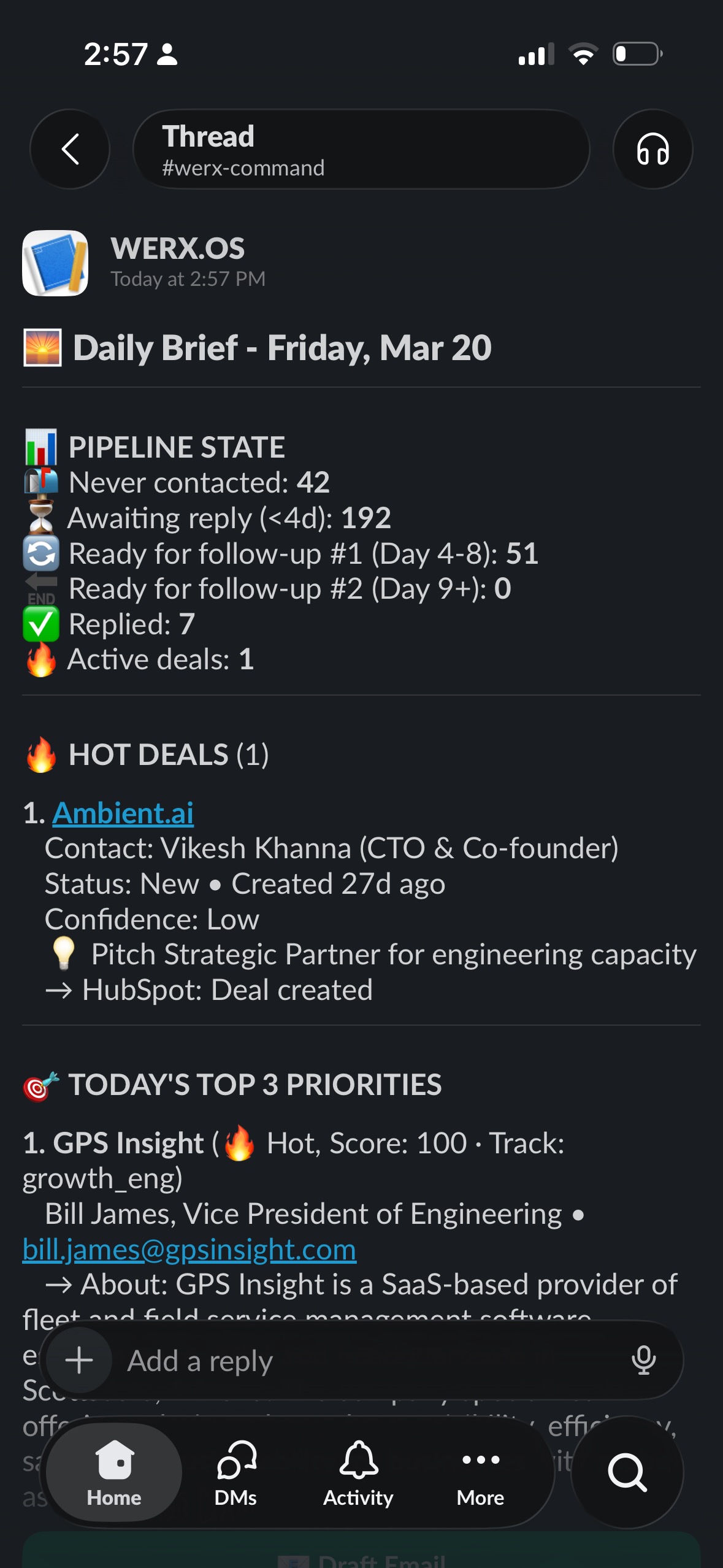
Daily Brief
Pipeline state, hot deals, and today's top priorities — delivered every morning.
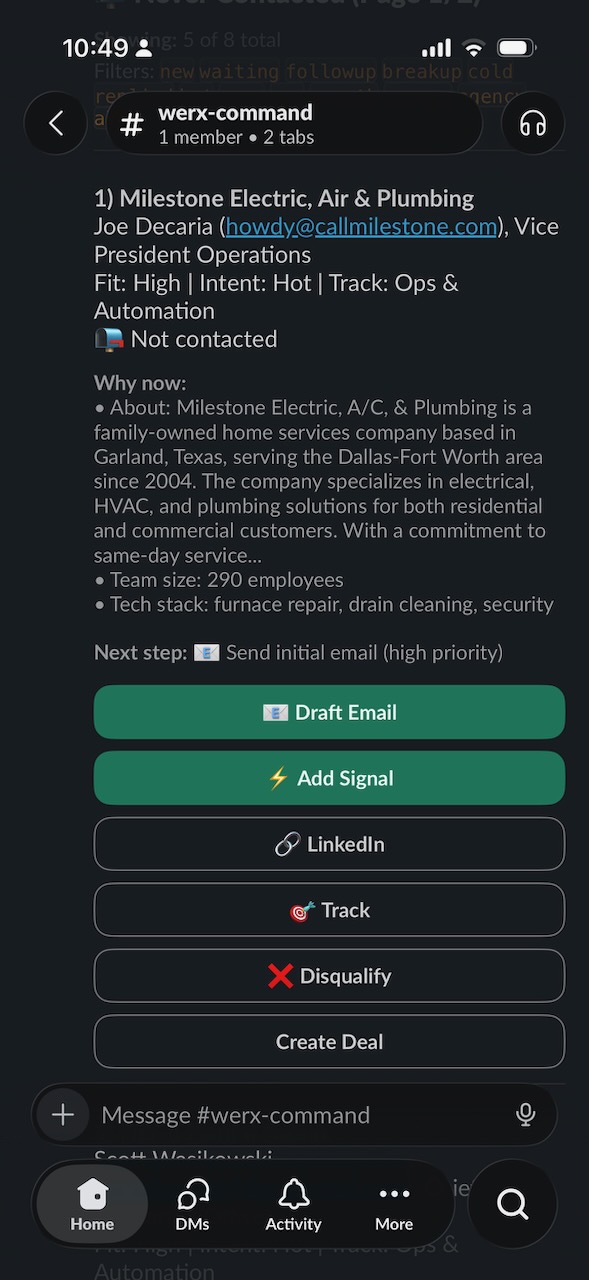
Prospect View
Every lead scored, enriched, and ready to act on — with one-tap email drafting.
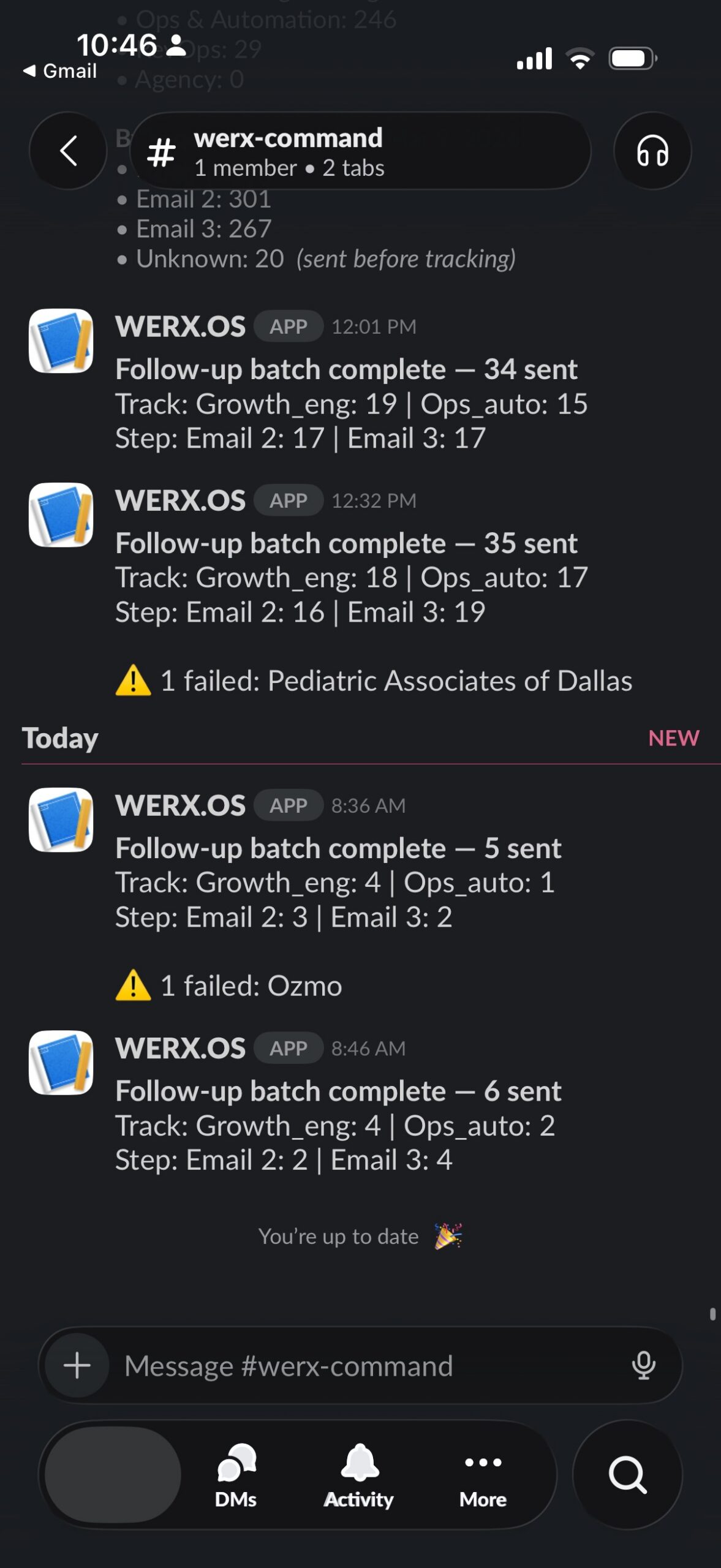
Automated Follow-Up
Batch runs every morning. Sends by track and sequence step, reported back to Slack.
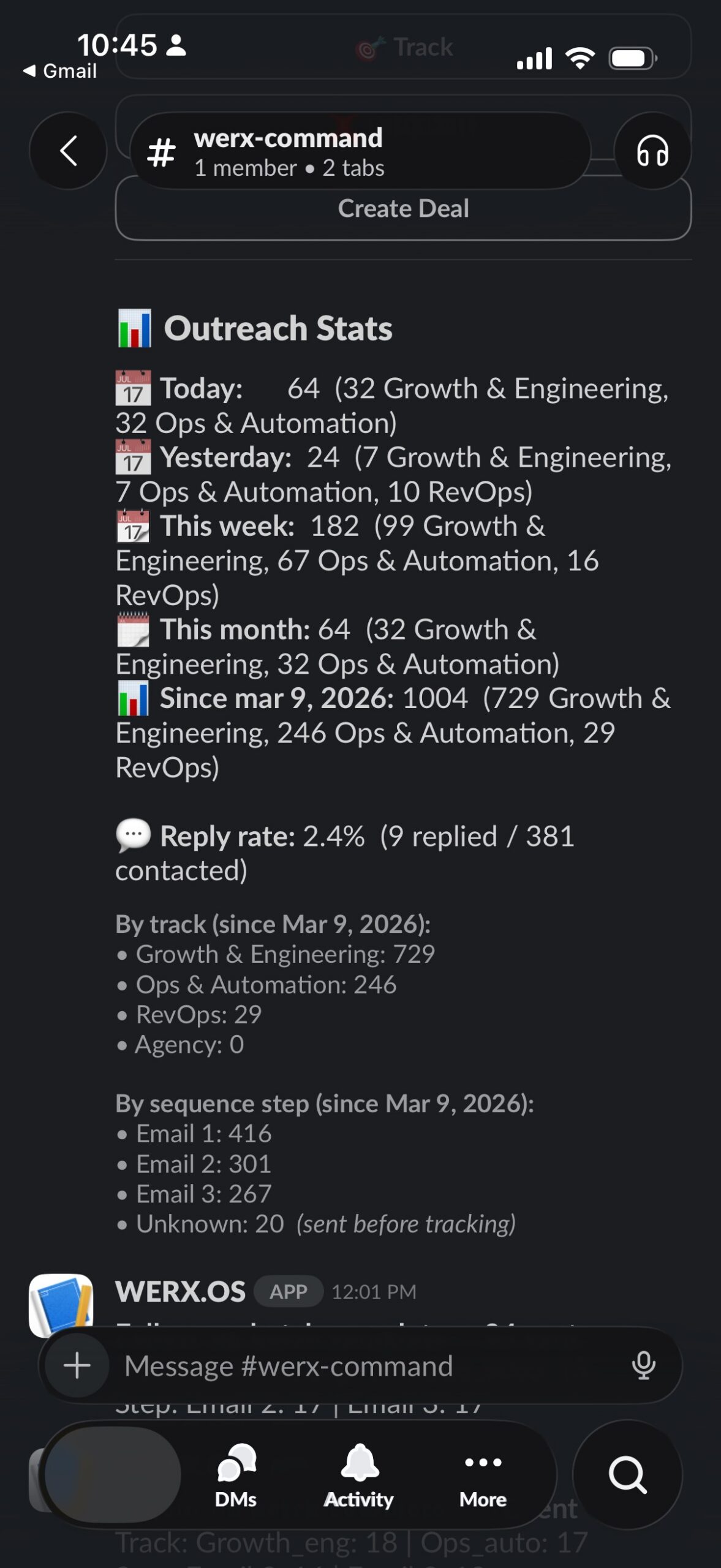
Stats & Actions
Reply rate, sends by track, sequence step breakdown, and today's checklist.
Not just visibility.
Command of your entire operation.
We build your operating layer starting from the problem that actually matters. See it, act on it, and move on — without leaving Slack.